Template

About the method to save a web page,I succeeded to save by Web page complete form even if the way to indicate by imputting text on the image not to add text on image.Saving by Webpage complete form and keeping Web accessibility coudn't save till now.This is my original. the image coudn't save till now.the background had been indicated in color code till now because the background doesn't save and see. Generally, a menu button doesn't indicate a letter on the web page not to be separated text and image background.To be separated text and image background on the web page is important for a blinder person.They read a text in a soft. This template had been made by"Web accessibility"so as to correspond a blind person. This is my copyright.© But an individual can use in free on non-profit.
The example can indicate by text on pairs by a image and color code.[Black]
This is the one which can indicate by text on pairs by image and color code[Right side is black color code.]. I'd like you to drag on this image. The test turn overs. This is the way which can browse by the text for the blind. There was the way to indicate by color code[Example:background-color: #333333; or #black in CSS] till now. It coudn't save by image in fully-format till now.
The bottom iamge is the one after imputting"Write***here."in the index file.[This can prove a template to correspond NVDA as a screen reader soft if you drag by left click. ]
You can make a top page by copy & paste.You can watch to click here.

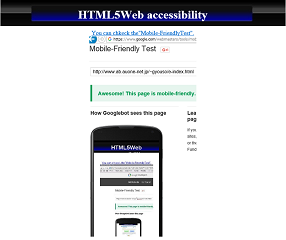
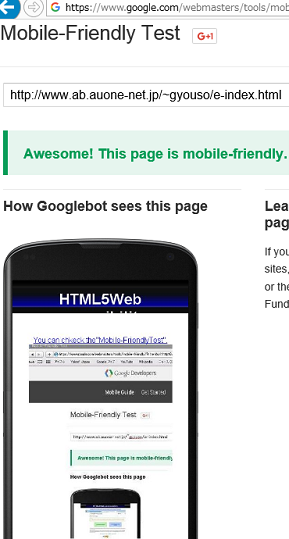
This is Mobile-FriendlyTest. Write in mysite's URL:http://gyouso2.extrem.ne.jp/e-index.html
Way to copy
Drag like the following illustration. Drag from"<!DOCTYPE html>"till"</html>",Save in memo pad,Write"index.html"in file name.That's all.
You have to push under the image,can watch the how to copy in animation.
This is my original.this has a copyright. But you can use in free on non-profit.©
mail:szheyuan383@gmail.com
You can watch by streaming the way to make about copy&paste
<html lang="en">
<head>
<meta charset="UTF-8">
<title>Write title here within 60 letters.</title>
<meta name="viewport" content="width=device-width, initial-scale=1">
<link rel="stylesheet" href="https://unpkg.com/ress/dist/ress.min.css" />
<link rel="stylesheet" href="style.css" />
<meta name="description" content="Write explanation about this web page here within 30 letter." />
<meta name="keywords" content="Write keyword about your page. " />
<meta name="author" content="anonymous" />
<link rel="next" href="index.html" />
<link rel="icon" href="favicon.ico" />
</head>
<body>
<article class="title">
<h1>Write here.</h1>
<p>Write here.</p>
<img src="a-1.jpg" alt="Explain about the image" title="Explain about the image/>
<p>Write here.</p>
<img src="a-2.jpg" alt="Explain about the image" title="Explain about the image"/>
<p>Write here.</p>
<img src="a-3.jpg" alt="Explain about the image" title="Explain about the image"/>
<p>Write here.</p>
<img src="a-4.jpg" alt="Explain about the image" title="Explain about the image"/>
<p>Write here.</p>
<img src="a-5.jpg" alt="Explain about the image here." title="Explain about the image"/>
<img style="border:0;width:88px;height:31px" src="http://jigsaw.w3.org/css-validator/images/vcss" alt="Valid CSS!" /></a></div>
</body>
</html>
Save in memo pad,Write "index.html"in file name.
Next,making a CSS file.
Drag all in pink background. Save in memo pad.Write "style.css" in the file name.
Cope from"@charset "UTF-8";"till".menu0 img { max-width: 100%;}".

html {
font-size: 100%;
}
img {
max-width: 100%;
}
body {
background:url(title.jpg) no-repeat;
background-position: 50% 0%;
text-align: center;
color: #ffffff;
}
#body {
width: 765px;
margin-top: 40px;
}
#contents {
margin-top:25px;
}
p {
font-style:normal;
font-size: 20px;
color: #333333;
text-indent: 1em;
}
img {
max-width: 100%;
}