模板
这 按钮 有 三层。按钮 上 有 教科书。色彩 规定 上 有 教科书。这 是 原作。这 用 也 盲人。文字 的 画像 也 保在。这 是 惟一。这 在 HTML。打入「打入 这儿。」。画像 和 文字 不 粘土。画像 和 教科书 分离。
请下载盲人 用 NVDA按 这儿。
个人 是 免费。©这 是 著作权。mail:szheyuan383@gmail.com

你 能看 模板。 模板。

Mobile-FriendlyTest请打入 http://gyouso2.extrem.ne.jp 和 还是"/zh-index.html"。
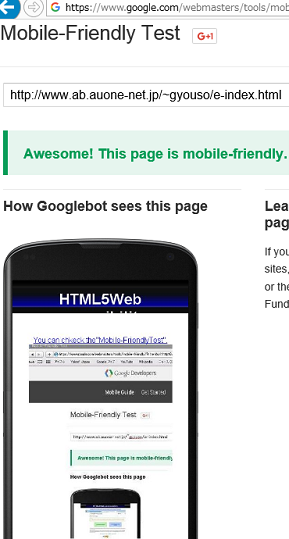
抄写 模板。
个人 是 免费。©这 是 著作权。
mail:szheyuan383@gmail.com
你 能 看 色色 表示。打入http://gyouso2.extrem.ne.jp/zh-index.html 这。
请复印 从 "<!DOCTYPE html>"到"</html>"。保在 "index.html"。
<!DOCTYPE html>
<html lang="en">
<head>
<meta charset="UTF-8">
<title>打入 这。</title>
<meta name="viewport" content="width=device-width, initial-scale=1">
<link rel="stylesheet" href="https://unpkg.com/ress/dist/ress.min.css" />
<link rel="stylesheet" href="style.css" />
<meta name="description" content="打入 这。" />
<meta name="keywords" content="打入 这。 " />
<meta name="author" content="anonymous" />
<link rel="next" href="index.html" />
<link rel="icon" href="favicon.ico" />
</head>
<body>
<article class="title">
<h1>打入 这。</h1>
<h1>打入 这。</h1>
<p>打入 这。</p>
<img src="a-1.jpg" alt="打入 这。" title="打入 这。"/>
<p>打入 这。</p>
<img src="a-2.jpg" alt="打入 这。" title="打入 这。"/>
<p>打入 这。</p>
<img src="a-3.jpg" alt="打入 这。" title="打入 这。"/>
<p>打入 这。</p>
<img src="a-4.jpg" alt="打入 这。" title="打入 这。"/>
<p>打入 这。</p>
<img src="a-5.jpg" alt="Explain about the image here." title="打入 这。"/>
</body>
</html>
<html lang="en">
<head>
<meta charset="UTF-8">
<title>打入 这。</title>
<meta name="viewport" content="width=device-width, initial-scale=1">
<link rel="stylesheet" href="https://unpkg.com/ress/dist/ress.min.css" />
<link rel="stylesheet" href="style.css" />
<meta name="description" content="打入 这。" />
<meta name="keywords" content="打入 这。 " />
<meta name="author" content="anonymous" />
<link rel="next" href="index.html" />
<link rel="icon" href="favicon.ico" />
</head>
<body>
<article class="title">
<h1>打入 这。</h1>
<h1>打入 这。</h1>
<p>打入 这。</p>
<img src="a-1.jpg" alt="打入 这。" title="打入 这。"/>
<p>打入 这。</p>
<img src="a-2.jpg" alt="打入 这。" title="打入 这。"/>
<p>打入 这。</p>
<img src="a-3.jpg" alt="打入 这。" title="打入 这。"/>
<p>打入 这。</p>
<img src="a-4.jpg" alt="打入 这。" title="打入 这。"/>
<p>打入 这。</p>
<img src="a-5.jpg" alt="Explain about the image here." title="打入 这。"/>
<div id="footer"><a
href="http://jigsaw.w3.org/css-validato打入 这。r/check/referer">
<img style="border:0;width:88px;height:31px" src="http://jigsaw.w3.org/css-validator/images/vcss" alt="Valid CSS!" //></a></div>
<img style="border:0;width:88px;height:31px" src="http://jigsaw.w3.org/css-validator/images/vcss" alt="Valid CSS!" //></a></div>
<div class="menu0"><img src="title.jpg" alt="title image" title="title image file"
width="0" height="0" /></div>
</article></body>
</html>
请复印 CSS。
请保在「style.css」从 " @charset "UTF-8";" 到 "..menu0 img {
max-width: 100%;
}。

@charset "UTF-8";
html {
font-size: 100%;
}
img {
max-width: 100%;
}
body {
background:url(title.jpg) no-repeat;
background-position: 50% 0%;
text-align: center;
color: #ffffff;
}
#body {
width: 765px;
margin-top: 40px;
}
#contents {
margin-top:25px;
}
p {
font-style:normal;
font-size: 20px;
color: #333333;
text-indent: 1em;
}
img {
max-width: 100%;
}
html {
font-size: 100%;
}
img {
max-width: 100%;
}
body {
background:url(title.jpg) no-repeat;
background-position: 50% 0%;
text-align: center;
color: #ffffff;
}
#body {
width: 765px;
margin-top: 40px;
}
#contents {
margin-top:25px;
}
p {
font-style:normal;
font-size: 20px;
color: #333333;
text-indent: 1em;
}
img {
max-width: 100%;
}
请保在"title.jpg"。

你 能确认 模板。